
Table of Content
- Quick Answers Before You Start
- What Is the GoldenBet App and Which Mobile Access Formats Are Available
- GoldenBet App Download: Where to Get the File and What to Check First
- GoldenBet Installation Steps on Android
- GoldenBet Unknown Sources: How to Enable the Permission and Why It's Needed
- How to Use GoldenBet on iOS and iPhone Without an APK
- Features and Benefits of the GoldenBet Casino App for Play
- Deposits, Withdrawals, and Payment Methods on Mobile
- Bonuses and Promotions for Mobile Players
- Security, Updates, and Common Issues When Using the App
- What the App Looks Like Inside: A Visual Overview
- FAQ: GoldenBet App Download and Mobile Use
Quick Answers Before You Start
- Is there an app in the App Store or Google Play? No. GoldenBet is not listed on official app stores. On Android you can install an APK from the official site (where available by region), and on iPhone you add a browser shortcut (PWA) via Safari.
- Best way to play on mobile? Open goldens.bet in your phone's browser and add the shortcut to your home screen. It works like a full-screen app with no download needed.
- Is it safe? The platform uses TLS 1.2/1.3 encryption and supports biometric login. Only ever download files from the official domain.
- Can I deposit and withdraw from mobile? Yes. Cards, e-wallets, and other payment methods are fully available through the mobile interface.
- Do I keep my existing account? Yes. One account works across all devices; creating a second account is strictly prohibited.
Last updated: July 2026
The iGaming industry has shifted decisively towards mobile interfaces, and the numbers back that up. In 2025, mobile and tablet devices accounted for 57.14% of global online gambling revenue, confirming smartphones as the dominant platform for casino games and betting alike. But accessing an online platform from your phone is not quite as simple as tapping "install." You need to understand the available access formats, check system requirements, and know how to protect your personal data along the way. Operators use different approaches to deliver content, from native clients to progressive web apps (PWA). Below is a thorough review of how GoldenBet mobile access is organised, which version suits you best, and why theoretical return to player (RTP) remains identical regardless of your operating system.
Important: GoldenBet operates under a Curaçao Gaming Authority (CGA) licence. It does not hold a UK Gambling Commission (UKGC) licence. Players in jurisdictions that require a local licence (such as the UK or Australia) should be aware that local regulatory protections may not apply. Check your local gambling laws before playing. Availability of the APK also depends on your jurisdiction; in some countries only the PWA browser version is offered.
What Is the GoldenBet App and Which Mobile Access Formats Are Available
The GoldenBet app is primarily a browser-based progressive web ecosystem (PWA) that provides access to casino and betting without requiring a native client from an official store. For mobile users, direct access through the site is the main and safest method, with an optional APK file download available in certain regions. The operator uses a hybrid model where the web client is recognised as the primary access point.
Worth noting: this is not unusual. Many casino mobile platforms outside the major regulated markets rely on the same approach, since Google Play and the App Store impose strict restrictions on real-money gambling apps.
| Access Format | Installation | Time-to-Play | Updates | Convenience |
|---|---|---|---|---|
| Android APK | Requires file download, enabling install permission, and confirmation. | Fast (1-3 seconds) after initial setup. | Manual: download a fresh file from the official site; no auto-patches from a store. | Dedicated icon; supports background data sync. |
| Mobile Browser | None needed. Enter goldens.bet in Safari, Chrome, or another browser. | Medium (2-5 seconds on first visit, faster afterwards). | Automatic server-side updates. You always have the latest version. | Full access to games and live betting, but requires entering the URL each time. |
| Home Screen Shortcut (PWA) | Added via browser menu ("Add to Home Screen"). | Very fast (under 1 second on return sessions). | Server-side sync with no local package downloads required. | App-like icon, interface without the address bar, minimal security risks. |
GoldenBet App Compatibility Table
Before downloading or adding a shortcut, check whether your device meets the requirements:
| Platform | Minimum OS Version | App / Shortcut Size | Notes |
|---|---|---|---|
| Android | Android 7.0+ (8.0+ recommended for live casino) | ~78 MB (APK) | Push notifications, biometric login supported |
| iOS | iOS 13+ (16.4+ for push notifications via PWA) | ~92 MB (cached PWA data) | Face ID / Touch ID login; added via Safari only |
| Windows / macOS | Chrome 110+ / Firefox 108+ / Safari 15+ | Browser-based | Instant play, no installation needed |
For stable live dealer streams and smooth animations, we recommend at least 3 GB of RAM and 200-400 MB of free storage on your device. Devices with only 2 GB RAM will handle slots and sports betting without trouble, but may experience some lag during live casino sessions.
Casino App, Browser, and Home Screen Shortcut - What's the Difference
So which format should you actually pick? Access via the APK format offers background data sync and seamless push notifications, while the browser and home screen shortcut rely on standard browser sessions. The shortcut eliminates the need to type in the URL manually, functioning like a full-screen casino mobile interface. Using the PWA significantly reduces RAM consumption compared to heavy local clients, maintaining frame rate stability during live dealer streams.
In practice, the difference between the APK and the PWA shortcut is smaller than you might expect. Both give you the same games, the same account, and the same cashier. The APK just adds push notifications and slightly smoother background behaviour.
For a deeper look at how iGaming platforms handle security and mobile delivery, see our dedicated overview.
Who Is the Mobile Format Best Suited For
The GoldenBet mobile format is ideal for players who prefer quick sessions. Checking live odds during a commute, spinning a few slots on a break, or placing in-play bets in real time: these are the scenarios where phone access genuinely shines.
"The smartphone is the only platform that delivers all preferred betting features: instant 24/7 wagering and integrated electronic transactions." - Hing et al., study of platform feature preferences for sports betting (n=408), Entertainment Computing / ScienceDirect, 2024. https://www.sciencedirect.com/
The pre-match fixed-odds segment still leads at 56.29% of betting activity, but live/in-play betting is growing at 13.79% CAGR through 2031, driven largely by mobile access. Browser shortcuts are particularly effective for users with budget devices, as they keep RAM overhead to a minimum while preserving responsiveness in live games. If your phone is a few years old and you are worried about performance, the PWA route is probably your best bet. Well, your best option, rather.
GoldenBet App Download: Where to Get the File and What to Check First
The official GoldenBet app download should only be initiated from the operator's authorised domains, goldenbet.com or goldens.bet, to avoid data compromise. Navigate to the mobile download section of the website and ignore third-party aggregators. Unofficial sources offering the file frequently lack any licensing controls and may distribute modified packages.
This is one of those areas where a moment of caution saves real headaches later. Let's be clear: if you find a GoldenBet download link on a random forum or file-sharing site, walk away.
"Enabling installation from unknown sources should be limited to the minimum time necessary and disabled immediately after completing the sideloaded app installation." - National Institute of Standards and Technology, Mobile Threat Catalogue, entry STA-8 (2025). https://pages.nist.gov/mobile-threat-catalogue/
A Note on Fake APK Files
Be careful. In some regions (notably Australia and the UK), GoldenBet does not publish an official APK at all. If you see a "GoldenBet" app on Google Play, it is almost certainly a third-party listing that the operator has no control over. A separate brand called "Goldbet" (card games) also causes confusion; its APK is not affiliated with GoldenBet casino. Always download only from the official domain, and if no APK is offered for your country, use the browser PWA method described above.
How to Check Your Current GoldenBet App Version
You can verify the current GoldenBet app version through your phone's system settings (Settings, then Apps, then GoldenBet) or on the official download page. Signs that you need an update include frequent disconnections during live sessions, error messages about an outdated API, or failed deposit attempts. The operator publishes current file hashes (SHA-256) on the official site for integrity verification.
If you are unsure whether your version is current, a quick comparison of the file hash takes under a minute and gives you certainty. It is a small step that matters.
What to Check Before You Download the Application
Before starting the GoldenBet download, confirm your device meets these requirements:
- Android: Version 7.0 or later (8.0+ recommended for live casino), 3 GB RAM, 200-400 MB free storage.
- iOS: Version 13 or later (16.4+ recommended for PWA push notifications).
- Stable internet connection for the initial download.
Verification Checklist
- Source: The URL must belong to a verified domain (goldenbet.com or goldens.bet).
- Permissions: The file should not request excessive system permissions (for example, access to your contacts or SMS).
- Integrity: Compare the digital signature using apksigner or check the SHA-256 hash published on the official site to rule out file tampering.
- Scan: Upload the APK to VirusTotal before installing for a multi-engine malware check.
GoldenBet Installation Steps on Android
The standard GoldenBet installation steps involve five sequential actions: downloading the file, confirming system permissions, unpacking, installing, and the first launch. The process on Android requires careful attention to security policies. Only after completing every step will the app be ready for normal use.
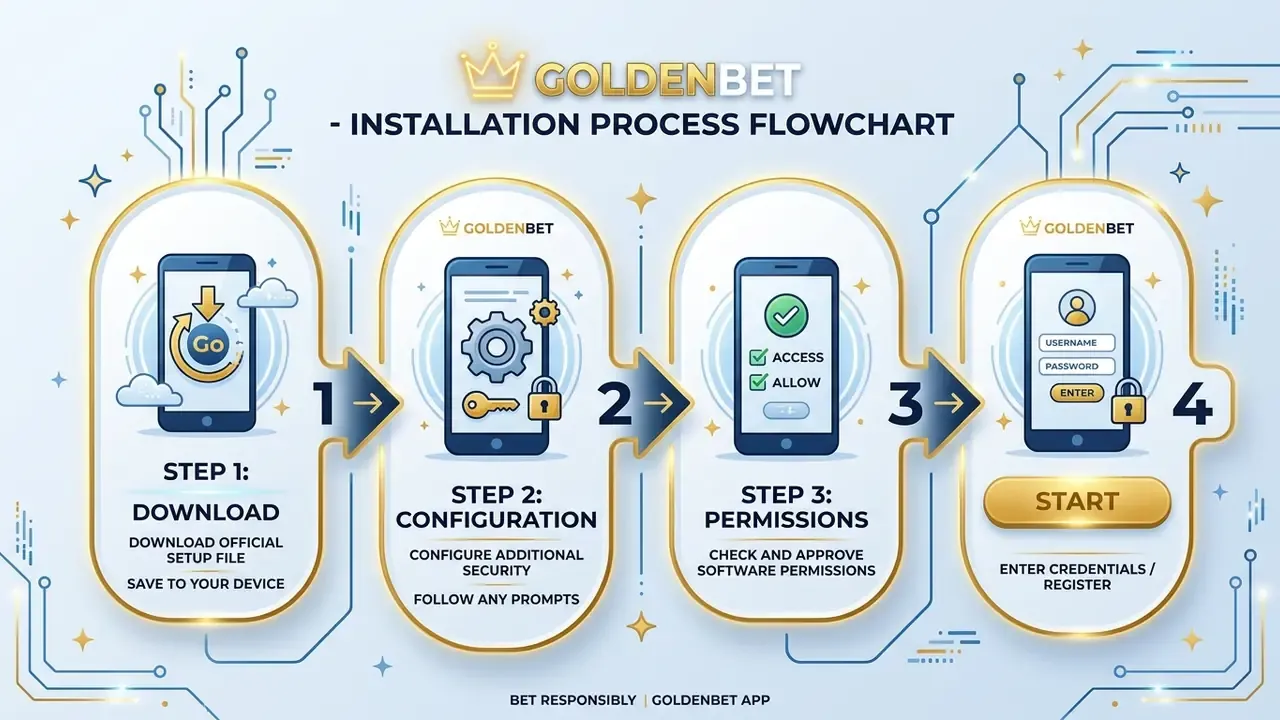
- Open goldens.bet in your mobile browser and tap the "Android" download button in the mobile section.
- Once the download completes, open your "Downloads" folder and tap the APK file.
- If prompted, grant the specific browser (e.g. Chrome) permission to install apps. See the section below on unknown sources.
- Wait for the installation to finish in the background.
- Open the app and proceed to login or registration.
Downloading the APK and Launching Installation
The direct APK download starts after tapping the "Android" button on the main page. To begin installation, tap the downloaded file in your notification panel. The system's package manager then copies the data and registers the necessary system keys. The entire process typically takes 15-30 seconds on a modern device.
One thing I have noticed: some phones display a brief "scanning" animation before allowing the install to proceed. That is normal. It is your device's built-in security check running, not a sign of a problem.
First Login After Installation
Your first login automatically links the installed app to your existing account. Your profile synchronises your balance across casino and sports betting, so there is no need to create a separate account. Synchronised login ensures session transparency and applies all responsible gambling settings at account level. Deposit limits, session time limits, and self-exclusion carry over from the desktop version without any manual reconfiguration.
GoldenBet Unknown Sources: How to Enable the Permission and Why It's Needed
Disclaimer: The information below is general in nature and does not replace advice from an information security specialist. Changing your device's system settings is at your own discretion and may affect your data protection level. Always restore the default security setting once installation is complete.
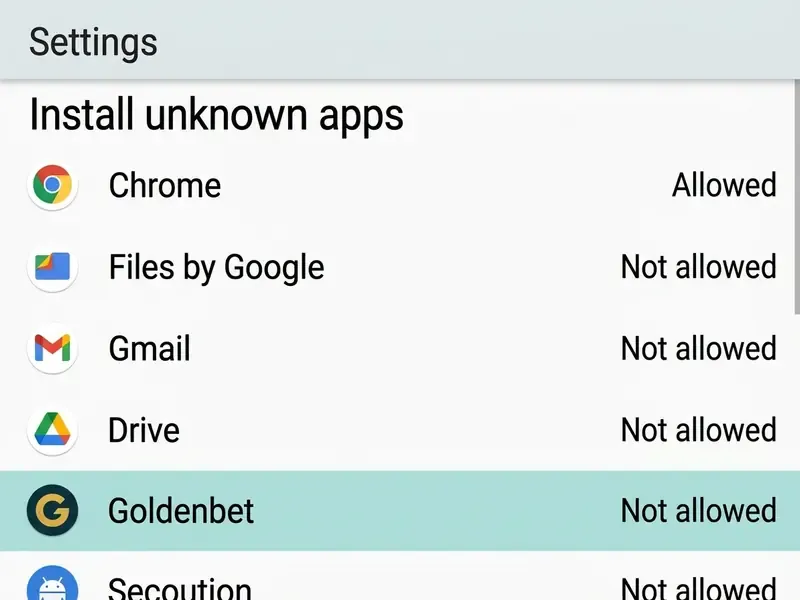
The "unknown sources" permission is a system setting that allows the operating system to bypass its block on installing files from outside the official store. This is done temporarily and only for the specific browser you used for the download. Because official app marketplaces may impose local gambling restrictions, installing the GoldenBet APK requires briefly lifting this protection for one app, after which security settings should be immediately returned to their default state.
Where to Find Unknown Sources in Android Settings
In current OS versions (Android 8.0 through 15), the global toggle has been removed. Instead, the permission is granted individually per app. The path is:
Settings, then Apps, then Special app access, then Install unknown apps, then select your browser (e.g. Chrome), then Allow from this source
On older versions (Android 7 and below), the path was Settings, then Security, then Unknown sources (a single global toggle), but this is no longer relevant for modern devices.
What to Do If Installation Is Blocked or a Warning Appears
If installation is blocked by Google Play Protect, follow these steps:
- Open the Google Play Store app.
- Tap your profile icon, then Play Protect, then Settings (gear icon).
- Temporarily disable "Scan apps with Play Protect."
- Complete the GoldenBet APK installation.
- Immediately re-enable Play Protect after installation.
This is a standard Android system warning that appears for any APK installed outside the Play Store and does not indicate that the file itself is harmful, provided you downloaded it from the official GoldenBet domain. Still, it is a good reminder to double-check that URL before proceeding.

How to Use GoldenBet on iOS and iPhone Without an APK
The iOS ecosystem does not permit direct installation of APK files. Instead, GoldenBet provides app-like access through the Safari browser, creating a home screen shortcut that opens in a dedicated full-screen window with no address bar and no browser tabs. This is a PWA (Progressive Web App) and is the only official method for iPhone and iPad users.
Adding GoldenBet to Safari on Your Home Screen
- Open goldens.bet in Safari (this does not work in Chrome or other iOS browsers).
- Tap the Share button (the square with an upward arrow) at the bottom of the screen.
- Scroll down and select "Add to Home Screen."
- On iOS 16.4 and later, enable the "Open as Web App" toggle if it appears. This gives you the full-screen, app-like experience.
- Tap "Add" in the top-right corner.
You will now have a GoldenBet icon on your home screen that opens the site in a clean, full-screen view. Safari on iPhone handles touch controls particularly well for slots and table games. Swiping through game lobbies and tapping spin buttons feels responsive and smooth, which matters more than you might think during longer sessions.

How iOS Access Differs from Android App Download
Unlike the Android APK process, the iOS infrastructure does not download executable packages locally. This saves storage space and eliminates the risk of library conflicts. Login on iOS goes through WebKit's secure protocols, and there is no resource-heavy background data synchronisation. However, iOS PWAs have some limitations compared to the native Android APK:
- Push notifications require iOS 16.4+ and only work when the PWA shortcut has been added to the home screen.
- Background sync is not supported. Data refreshes only when the app is open.
- Cache lifespan is limited to 7 days by Apple's Service Worker policy, meaning the PWA re-caches on each launch after a week of inactivity.
Despite these differences, for the vast majority of players the iOS PWA experience is practically identical to the APK for day-to-day use. Slots, live betting, account management, and GoldenBet casino games all work seamlessly through the shortcut.
Features and Benefits of the GoldenBet Casino App for Play
Whether you use the installed APK or the PWA shortcut, the GoldenBet mobile experience focuses on speed and convenience, providing immediate access to slots, live tables, and sports betting. The platform scales interface elements to a minimum tap target of 44x44 pixels, which is critical for accurate input during fast-paced live betting.
Quick Login, Notifications, and Phone Convenience
Biometric integration (Face ID / Touch ID on iOS; fingerprint or face unlock on Android) enables instant login without typing a password. Over 85% of iOS gambling apps in regulated markets now support biometric login, up from roughly 40% just two years ago. Push notifications keep you informed about bet settlements, bonus offers, deposit confirmations, and security events.
Here is the honest flipside, though. While these features dramatically reduce the friction of accessing your account, they also make it easier to play impulsively. Set session time limits and deposit caps before you start, and review them regularly. Convenience should work for you, not against you.
Casino Games, Live Dealers, and Betting in Mobile Format
All formats, from classic slots to live dealer tables and sports betting, are integrated into a single interface. Games in live format automatically adjust video stream quality (adaptive streaming) to match your network bandwidth, ensuring smooth playback even when switching from Wi-Fi to mobile data.
What you can do through the GoldenBet mobile platform:
- Sports betting:Cricket, football, tennis, horse racing with live and pre-match markets featuring real-time odds updates.
- Slots:Hundreds of titles optimised for touch controls, with portrait and landscape modes.
- Live casino:Blackjack, roulette, baccarat with real dealers, streamed in HD.
- Account management:Deposit, withdraw, check transaction history, manage bonuses, all from the cashier section.
App-Exclusive Features Worth Knowing About
- Low-bandwidth mode:The app caches data, allowing you to check betting history and account balances even on a weak 3G connection.
- Dark mode UI:The interface is designed with a dark theme for comfortable night-time play. A small detail, but your eyes will thank you at 1am.
- In-app support chat:24/7 live chat accessible directly from within the app or PWA, with conversation history saved.

Deposits, Withdrawals, and Payment Methods on Mobile
One of the most common questions from players is how money moves in and out of the mobile version. The GoldenBet casino mobile interface provides full access to the cashier. The same payment methods and limits available on desktop work identically on your phone.
Available payment methods (may vary by region):
- Visa / Mastercard debit and credit cards
- E-wallets (Skrill, Neteller, ecoPayz, and region-specific options)
- Bank transfers
- Cryptocurrency (where supported by jurisdiction)
Key details:
- Minimum deposit and maximum withdrawal limits are displayed clearly on the cashier screen before you confirm any transaction.
- Withdrawal processing times depend on your chosen method. E-wallets are typically fastest (up to 24 hours), while bank transfers may take 3-5 business days.
- No additional fees are charged by GoldenBet for deposits or withdrawals through the mobile interface, though your payment provider may apply their own charges.
- Card payments are processed through PCI DSS-compliant payment processors. GoldenBet does not store full card numbers or CVV codes.
Tip: Save your preferred payment method within the app for one-tap deposits on future sessions. Always check that your withdrawal method matches your deposit method. Most operators require this for anti-money-laundering compliance.
Bonuses and Promotions for Mobile Players
GoldenBet offers promotions that are accessible through the mobile interface. While bonus availability and terms may change, here is what mobile players can typically expect:
- Welcome bonus:A deposit match bonus for new players, activated on the first deposit. Check the promotions page on goldens.bet for current percentages and maximum amounts.
- App-exclusive offers:Some cashback deals and daily login bonuses may be available only to players who access the platform through the GoldenBet casino app or PWA.
- Free spins:Periodically offered on selected slot titles, often tied to a minimum deposit.
Understanding wagering requirements (wager): Every bonus comes with conditions. Let's do the maths on what that actually means. The wagering requirement (e.g. 30x) means you must bet the bonus amount that many times before you can withdraw any winnings derived from it. So a £10 bonus with a 30x requirement means £300 in total wagers before withdrawal. Always read the full terms on the promotions page, and pay attention to:
- The wagering multiplier (e.g. 30x, 35x)
- Time limit to complete wagering (e.g. 30 days)
- Maximum bet size while wagering (often capped at a low amount like £5 per spin)
- Game contribution percentages (slots usually count 100%, table games may count 10% or less)
Tip: Track your active bonuses, wagering progress, and expiry dates in the bonus hub within your account dashboard. One-tap opt-in is available for most offers.
Security, Updates, and Common Issues When Using the App
The operator maintains security through TLS 1.2/1.3 encryption for all data in transit and AES-256 encryption for sensitive data at rest. Login sessions are protected by OAuth 2.0 protocols with scoped tokens that expire automatically after inactivity. Two-factor authentication (2FA) via authenticator apps is available for additional account protection.
"Among adults who gamble on online casino games and slots, the rate of problem gambling reaches 15.8%, significantly higher than the average across all gambling formats." - Meta-analysis of global gambling prevalence, ScienceDirect (2024). https://www.sciencedirect.com/
That statistic underlines why the security section is not just about encryption. It is also about protecting yourself from excessive play. Use the built-in responsible gambling tools (deposit limits, session time alerts, self-exclusion) proactively, not after a problem has already developed.
When You Need to Update the App Version
An urgent need to update the GoldenBet app version arises when you experience frequent disconnections during live sessions, see system messages about an outdated API, or find that deposit operations are being refused. Updates for the APK are not automatic. You need to download the latest version from the official site and install it over the existing one. The PWA version updates automatically on the server side, so browser users always have the latest release without lifting a finger.
Why the App Won't Install or Won't Open
The most common technical issues on Android are:
- Insufficient RAM or storage: Ensure at least 200 MB of free space and close background apps before installation.
- Aggressive battery optimisation: Android may forcefully close sessions to save battery. Go to Settings, then Battery, then GoldenBet and select "Unrestricted" or "Don't optimise."
- Network issues: A connection slower than 5 Mbps can cause timeouts during live sessions. Switch to Wi-Fi where possible, especially for live casino.
- OS version incompatibility: Running a beta OS version or an Android version below 7.0 can cause conflicts. Update your phone's operating system if possible.
If none of these steps resolve the issue, try fully uninstalling the app, clearing residual files, and performing a fresh installation from the official site. I know that sounds tedious, but a clean install resolves the majority of stubborn problems.
Disclaimer: The information in this section is general in nature and does not replace advice from a qualified legal professional or responsible gambling specialist. Service availability depends on the legislation of your jurisdiction. If you are concerned about your gambling behaviour, contact a support organisation such as BeGambleAware (UK), Gambling Help Online (Australia), or the operator's own self-exclusion tools.
"Micro-betting is associated with severe forms of problem gambling and impulsivity; frequent participation in fantasy sports among young people is linked to elevated risk of gambling disorder." - Scoping review on micro-betting and fantasy sports, PubMed / Springer (2024). https://pubmed.ncbi.nlm.nih.gov/
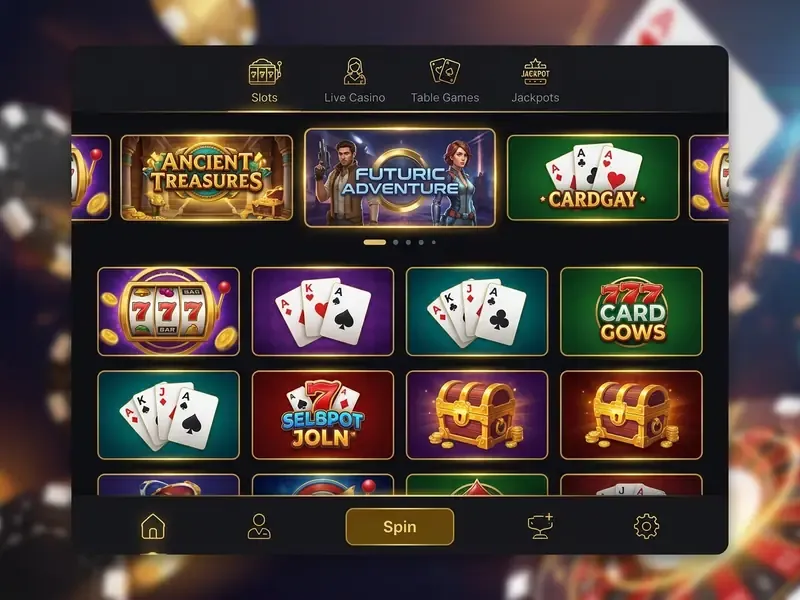
What the App Looks Like Inside: A Visual Overview
While screenshots vary as the platform updates, here is what to expect when you open GoldenBet on your phone:
- Lobby:A tiled grid of game categories (Slots, Live Casino, Sports, Promotions) with a search bar and filters by provider or game type. Navigation feels intuitive, though the sheer number of games GoldenBet offers can be slightly overwhelming at first.
- Sports section:Live odds displayed front and centre with current score, time remaining, and key markets. The bet slip slides up from the bottom of the screen for quick stake entry.
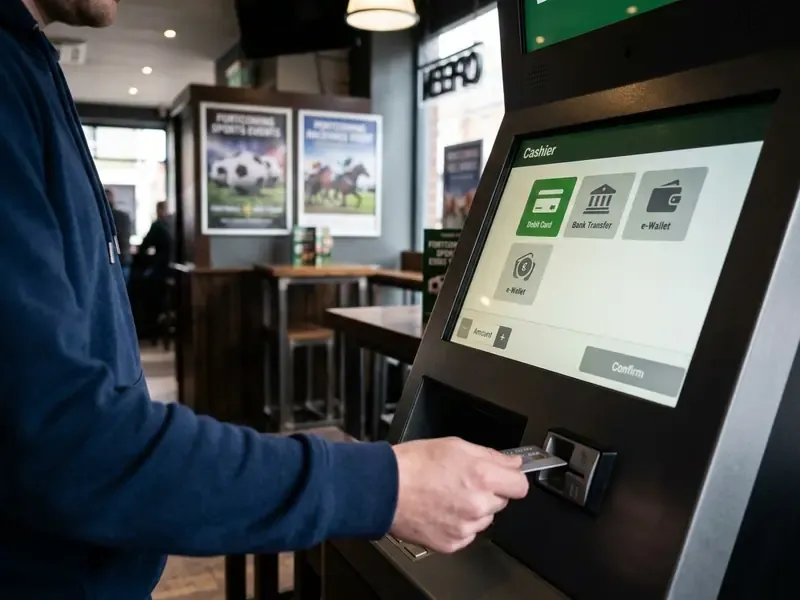
- Cashier:Accessible from the main menu. Displays your balance, recent transactions (with timestamps and status), and buttons for Deposit and Withdraw.
- Account menu:Contains your profile, verification status, bonus tracker, responsible gambling settings, and support chat.

FAQ: GoldenBet App Download and Mobile Use
Do I need a separate account for the app and the website?
No. The platform uses a single login. The Single Account Policy strictly prohibits creating duplicate accounts. Your balance, bonus progress, betting history, and responsible gambling settings sync instantly across all devices. Creating a second account risks permanent ban, confiscation of funds, and cancellation of all bonuses.
Can I use GoldenBet on a tablet or desktop?
Yes. The responsive interface adapts to tablets and desktop screens using CSS media queries. All features (games, live betting, deposits, withdrawals) work identically on a larger screen. No separate app is needed for Windows or macOS; simply open goldens.bet in any modern browser (Chrome 110+, Firefox 108+, Safari 15+, Edge 110+).
Is GoldenBet available in my country?
Availability depends on your local jurisdiction. GoldenBet holds a Curaçao Gaming Authority licence, which is accepted in many countries but does not satisfy the licensing requirements of all regulated markets (e.g. UK, Australia, Germany). If you are unsure, check the operator's terms and conditions or contact their 24/7 support team before registering.
What bonuses are available for mobile players?
Mobile players can access the same bonuses as desktop users, plus potential app-exclusive offers such as daily login bonuses and cashback deals. Check the promotions page within the app for current offers, and always read the wagering requirements before opting in. The maths does not promise a win, so treat bonuses as an extra rather than a strategy.
How fast are withdrawals through the mobile app?
Withdrawal speed depends on your payment method. E-wallets (Skrill, Neteller) typically process within 24 hours. Card withdrawals may take 1-3 business days, and bank transfers 3-5 business days. The cashier shows the status of every withdrawal request (submitted / processing / paid) in real time.
Does the app work on slow internet?
Yes. The PWA and APK both cache essential data, so you can browse menus, check balances, and review betting history even on a weak 3G connection. However, live casino streams and live betting with real-time odds do require a more stable connection. Wi-Fi is recommended for those features.
Where can I get help if something goes wrong?
GoldenBet offers 24/7 support via in-app live chat, email at support@goldenbet.com, and a built-in help centre with FAQs. Conversation history is saved within the app so you can reference previous interactions.
What should I do if I think I have a gambling problem?
"Cognitive-behavioural therapy is the treatment of choice for gambling disorder: randomised controlled trials consistently show reductions in gambling frequency and symptom severity, with effects lasting months after treatment ends." - NIDA Blog, "Gambling disorder in the age of mobile sports betting" (2025). https://nida.nih.gov/
If you feel that your gambling is becoming difficult to control, take immediate action:
- Use the self-exclusion and deposit limit tools in your GoldenBet account settings.
- Contact BeGambleAware at begambleaware.org (UK) or Gambling Help Online at gamblinghelponline.org.au (Australia) for free, confidential support.
- Speak to your GP or a mental health professional about a referral to a specialist service.
18+ · Gamble Responsibly · BeGambleAware.org
Set strict deposit limits before you play. Track the time you spend gaming and never use borrowed money or credit to place bets. Theoretical return to player (RTP) is a long-run statistical average, not a guarantee of profit. Only play with funds you can afford to lose without affecting your wellbeing. Availability of GoldenBet services depends on your local jurisdiction.